
ChatGPT vs Claude vs Copilot for Executives 2026
Jun 08, 2026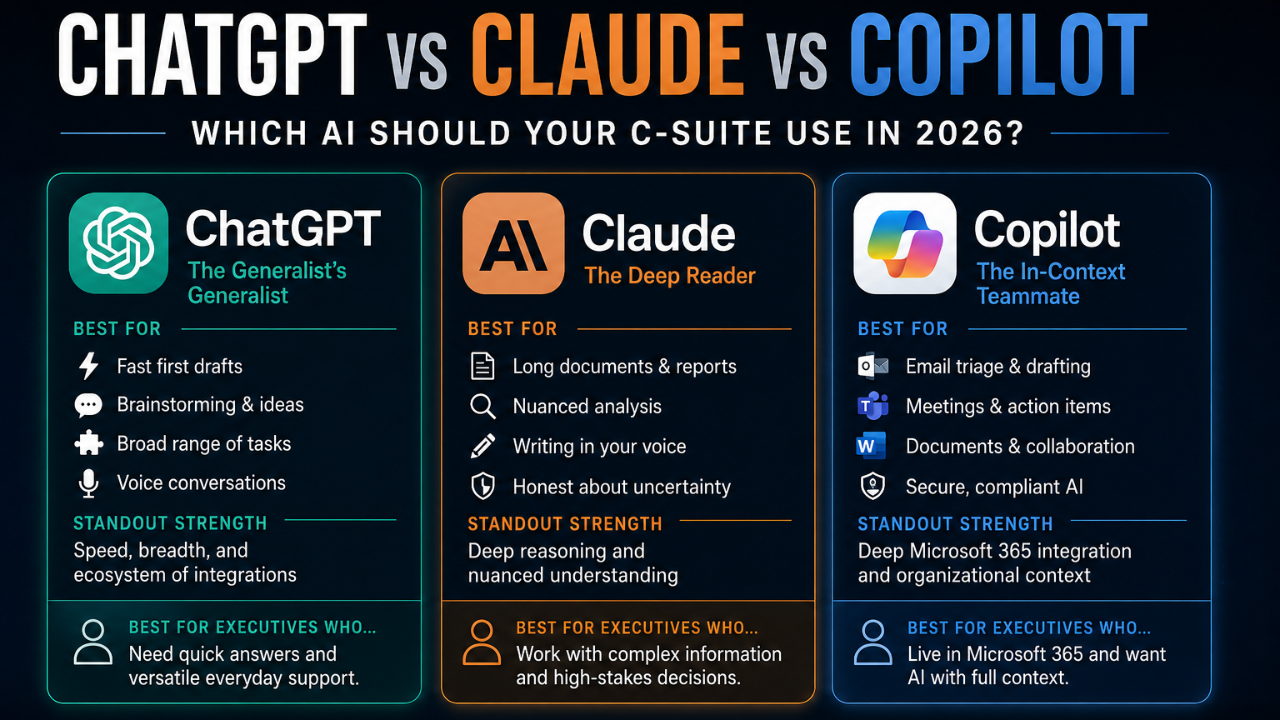
Every executive I've worked with this year has asked some version of the same question. "Which AI should we actually use? ChatGPT? Claude? Copilot? Something else?"
Two years ago, the question didn't matter. There was ChatGPT and there was everything else, and ChatGPT was good enough to ignore the rest. That window has closed. As of 2026, the three biggest models - OpenAI's ChatGPT, Anthropic's Claude, and Microsoft's Copilot - have diverged into genuinely different products that excel at different things.
The smart answer to the question isn't "which one is best." It's "which one for which job." Most executives I coach end up using two or three, picking based on what they're trying to do. Here's how to think about it.
ChatGPT: the generalist's generalist
What it's actually good at:
Speed and breadth. ChatGPT remains the fastest AI to give you a first draft on almost anything - an email, a memo outline, a brainstorm, a quick explanation of a concept. It also has the deepest ecosystem of plugins, custom GPTs, and integrations, which matters if your team wants to build their own AI workflows without writing code.
ChatGPT's voice mode is the most polished of the three. If you want to think out loud during a walk and have AI capture and structure the thoughts, ChatGPT wins.
Where it falls short:
Long-form analysis. When you paste a 30-page document and ask for nuanced analysis, ChatGPT tends to summarize at the surface and miss the deeper signal. It's faster but shallower than its competitors.
Confidence calibration. ChatGPT is more likely to fabricate confident-sounding answers when it doesn't actually know. For high-stakes decisions, this matters.
Best executive use case:
Quick first drafts. Daily reflection ("summarize my week"). Brainstorming. Anything where you need a fast 70%-good output that you'll refine yourself.
Claude: the deep reader
What it's actually good at:
Long-form reasoning and document analysis. Paste a 50-page contract, a research report, or a 90-minute meeting transcript, and Claude will give you an analysis that catches nuance ChatGPT misses. It's the closest current AI to having a smart junior analyst on retainer.
Honesty about uncertainty. Claude is more likely to say "I don't know" or "the data here is mixed" when that's the truthful answer. For decisions where being wrong is expensive, this matters a lot more than people initially expect.
Writing in your voice. Once you give Claude two or three samples of how you write - old emails, blog posts, memos - it can match your voice better than the other two.
Where it falls short:
Real-time data and integrations. Claude doesn't have the same plugin ecosystem as ChatGPT, and its web-browsing capabilities are newer and less battle-tested. If you need AI to live-pull data from your CRM, ChatGPT is more mature.
Image and audio output. Claude is strong on text, weaker on multimedia generation.
Best executive use case:
Strategic analysis of long documents (board packs, M&A diligence, legal review). Drafting communications that need to sound exactly like you. Decision memos where you want pushback, not agreement.
Copilot: the in-context teammate
What it's actually good at:
Working inside the Microsoft 365 stack. If your team lives in Outlook, Word, Excel, PowerPoint, and Teams, Copilot's superpower is that it's already there, with full context of your meetings, emails, files, and calendar. It doesn't need you to paste context in - it reads it directly.
Meeting recap and email triage. Copilot in Teams is probably the single highest-leverage AI use case for senior leaders in 2026. It captures the meeting, identifies action items, flags decisions, and even drafts the follow-up email. Hours saved per week.
Compliance and data governance. Copilot operates within your organization's existing Microsoft permissions and data policies. For regulated industries (healthcare, finance, federal), this is often the only AI that legal will approve.
Where it falls short:
Raw reasoning quality. Copilot uses OpenAI models under the hood, but the constraints Microsoft adds (for safety, compliance, and consistency) mean its output is often more cautious and less creative than going to ChatGPT directly. For strategic thinking, it's often the third-best of the three.
Cross-platform fluidity. If your team uses Google Workspace, Notion, Salesforce, or any non-Microsoft stack, Copilot is a much weaker fit.
Best executive use case:
Meeting management. Email triage and drafting. Document collaboration inside Microsoft 365. Anything where the AI's value comes from already knowing your context.
The decision matrix
Here's how I help executives decide:
- If you're new to AI and want one tool to start with: ChatGPT. Fastest to learn, broadest use cases, easiest to bring your team along.
- If you spend most of your week in long documents or high-stakes analysis: Claude. The reasoning quality on dense material is a genuine advantage.
- If your org is Microsoft-centric and meetings dominate your calendar: Copilot. The in-context advantage compounds quickly.
- If you're a single-leader operator with budget for two subscriptions: ChatGPT + Claude. They complement each other (speed + depth). Skip Copilot unless your org is Microsoft-first.
- If you're rolling out AI to a team of 50+: Copilot for the org-wide deployment, plus a small group of power users with ChatGPT or Claude for specialized work.
What most executives get wrong
Three common mistakes I see when senior leaders pick an AI:
Mistake 1: Picking based on brand familiarity.
Most executives default to ChatGPT because it's the name they know. That's fine as a starting point, but it's not always the right answer for your specific work. Spend an hour trying the same complex prompt on all three. The differences are obvious once you compare directly.
Mistake 2: Treating AI as one product, not a portfolio.
Smart users have all three (or at least two) and switch based on the job. The cost is trivial - under $100/month for all three subscriptions. The productivity differential between using the right AI for each job vs. forcing one to do everything is significant.
Mistake 3: Optimizing the AI without optimizing the prompt.
The biggest leverage isn't switching from ChatGPT to Claude. It's learning to prompt better. Any of the three, used with a well-structured prompt (role + context + task + format), will outperform any of them used with a one-line question. That's still where most of the productivity gap lives.
The 12-month outlook
All three models will keep improving rapidly. ChatGPT will expand its agent capabilities. Claude will likely add more multimodal output. Copilot will get tighter integration with Teams meetings and Outlook. The differences between them in 2027 will be different from the differences today.
That said, the underlying choice - generalist speed vs. deep reasoning vs. in-context productivity - will probably remain the right frame for at least the next 18 months. Pick based on what you actually need, not based on which one will be "best" in some abstract sense.
And whichever you pick: pair it with great prompting. The tool is the floor. The prompt is the ceiling.
|
The full AI Productivity Roadmap If you want my actual workflow for using all three together - including which prompts I use in which AI, my decision tree for when to switch, and the 21 prompts I save in each - download the AI Productivity Roadmap free at roadmaptofreedom.com/ai-roadmap. |
Chris McIntyre is a Certified Speaking Professional and MIT AI Strategy certified. He has trained over 300,000 professionals worldwide on AI productivity, leadership, and accountability. Clients include Google, NASA, Comcast, and the United Nations.