
The Executive AI Operating System: Why Your Calendar Runs Your AI ROI
Jul 27, 2026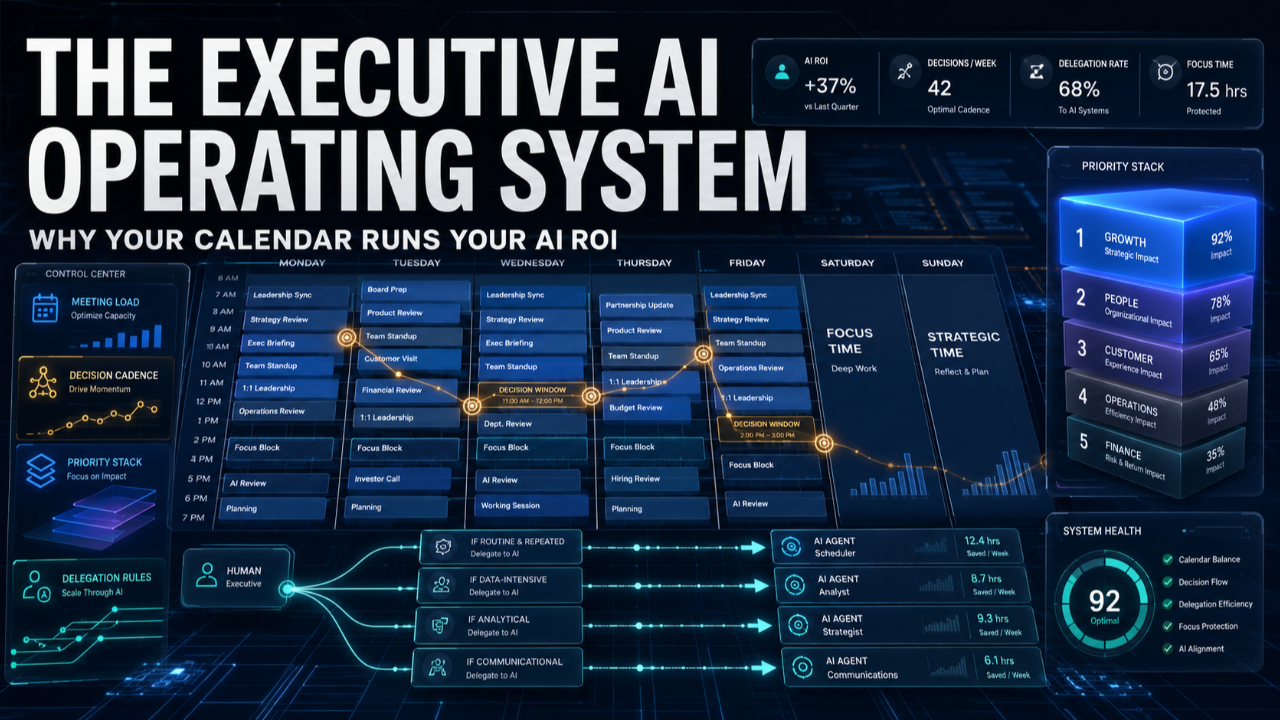
Every executive I work with has tried to "get good at AI" the same way. They collect prompts. They save a swipe file of clever instructions, bookmark a few threads, maybe buy a prompt pack. Three weeks later the prompts are gathering dust and the verdict is in: "We tried it. It didn't really change anything."
I've now watched this play out inside Fortune 100 companies, federal agencies, and YPO chapters more times than I can count. And the pattern is always the same. The prompts weren't the problem. The prompts were never going to be the answer.
Here's the uncomfortable truth. Your return on AI is not decided by how you prompt. It's decided by how you run your week. The leaders getting real leverage didn't find better prompts. They rebuilt their operating system around AI, so the tool has somewhere to plug in.
Prompts are the app. You're missing the operating system.
Think about how software actually works. Apps are useless without an operating system underneath them, coordinating memory, deciding what runs when, managing the handoffs. A brilliant app on no OS is just code that never executes.
That's exactly what a great prompt is inside a leader's week that hasn't changed. You produce one sharp output, feel a flicker of "oh, that's useful," and then fall straight back into the calendar that was already running your day: the back-to-back meetings, the reactive inbox, the decisions made in hallways and never written down. The prompt had nowhere to live.
An Executive AI Operating System is the layer underneath the prompts. It's the small set of routines that decide where AI enters your week, who owns the output, and how you know it worked. Install that, and even mediocre prompts start compounding. Skip it, and the best prompt in the world dies on contact with your Tuesday.
The four control surfaces
When I rebuild a leader's operating system, I'm only ever touching four things. I call them control surfaces because they're the levers that actually change behavior, not the dashboards you look at.
1. Meeting load. How much of your week is consumed by meetings, and what each one is supposed to produce. This is where most executives are bleeding the most time, and it's the fastest thing AI can compress. Not "AI takes notes." A meeting that reliably ends in a written decision, an owner, and a deadline, produced in the last five minutes while everyone is still in the room.
2. Decision cadence. The rhythm at which different kinds of decisions get made. Daily calls, weekly bets, monthly direction. AI makes it cheap to generate options, which is exactly why you need a cadence, or you'll drown in analysis. The system decides which decisions get the full workup and which get made in ten minutes.
3. Priority stack. The ranked, written list of what actually matters this quarter, sitting where you and your AI can both see it. Without it, AI just helps you do low-value work faster. The stack is what points the speed at the right target.
4. Delegation rules. What you hand to AI, what you hand to a person, and what stays on your desk because only you can own it. Most leaders never make these rules explicit, so they either delegate nothing to AI or delegate things that should never have left human hands.
Notice what's not on this list: which model you use, how you phrase your prompts, whether you bought the enterprise license. Those are real, but they're second-order. The four surfaces are where the leverage lives.
What it looks like when it's working
One COO I worked with was losing roughly twelve hours a week to meetings that produced recordings nobody watched and follow-ups nobody tracked. We didn't add an AI tool. We changed the operating system around the tool.
Every recurring meeting got a required output: a six-line decision memo generated live before anyone left. Her Monday decision review became a fixed 45-minute cadence where AI pre-drafted the options and she made the calls. Her priority stack went on a single page her chief of staff and her AI assistant both worked from. And we wrote down exactly three categories of work she was allowed to fully delegate to AI, three she could delegate with review, and three she had to keep.
Inside six weeks she was back to roughly a four-hour meeting load on her heaviest days, and the decisions were getting made faster and written down for the first time in years. The prompts she used were nothing special. The system around them was everything.
Why this is the executive's advantage, not the tool's
There's a reason this matters more for senior leaders than for individual contributors. An analyst can win with a good prompt because their work is bounded. Your work isn't. Your leverage comes from how the whole system runs: what gets escalated, what gets decided, what gets handed off. That's an operating-system problem by definition, and it's the one thing no vendor can sell you.
It's also the reason "AI adoption" keeps stalling at the top. Companies roll out licenses and training, measure logins, and wonder why nothing moved. Logins aren't adoption. A rewired operating system is adoption. The seat is the app. The system is the OS.
Over the next several posts, I'm going to take each of these four surfaces apart, one at a time, and show you the specific routine I install for each: how I compress meetings into decisions, how I build a decision cadence that survives a chaotic week, how the priority stack works, and where the delegation lines actually belong.
But start with the frame, because it changes everything downstream. Stop asking "what should I prompt?" Start asking "where in my week does this output have somewhere to go?"
So here's the question worth sitting with before you read the rest: if you mapped your last full week against those four surfaces, which one is quietly costing you the most, meeting load, decision cadence, priority stack, or delegation? That's where your AI operating system is broken. And that's where we start.
If you want the full build, the AI Productivity Roadmap walks through the exact operating system we install with executive teams, including the templates for all four surfaces. It's free to download.
Chris McIntyre is a Certified Speaking Professional and MIT AI Strategy certified. He has trained over 300,000 professionals worldwide on AI productivity, leadership, and accountability. Clients include Google, NASA, Comcast, and the United Nations.